This german webcast shows you, how to setup a cheap 2-node Microsoft Hyper-V Cluster.
Tuesday, May 3, 2016

Wednesday, January 27, 2016
Webcast: Macrium Reflect - Technicians Portable Application Support
Macrium Reflect is an easy to use Windows backup tool. There a technicial license model which allows you to backup/restore multiple PCs. Using this license model you can use Macrium Reflect as a portable application on a USB stick. At the same time the USB stick contains a bootable restore environment.
This is a german webcast about to use it.
Monday, December 21, 2015
FSLogix Apps - App Containerization & User Profile Containers
german webcast about FSLogix Apps - App Containerization & User Profile Containers.
This video shows the basic concepts of FSLogix Apps and also an advanced example running multiple Microsoft Office versions on one RDSH Server.
This video shows the basic concepts of FSLogix Apps and also an advanced example running multiple Microsoft Office versions on one RDSH Server.
Wednesday, November 4, 2015
Webcast: PernixData Architect - learn about the I/O Pattern of your virtual infrastructure
german webcast about the new PernixData Architect.
PernixData Architect provides deep insight into the I/O pattern of each VM including latency, IOPS, throughput, block size, read/write ratio,...
PernixData Architect provides deep insight into the I/O pattern of each VM including latency, IOPS, throughput, block size, read/write ratio,...
Thursday, October 22, 2015
Some findings about file type associations (FTA) in Windows 8.1, 10 and Server 2012 R2
There is a lot of confusion about FTA since Microsoft introduced some changes since Windows 8. There are already very good blog posts on the internet which give some insights and suggestions.
One of those blog post, which in my opinion has done currently the best deep-dive into the inner workings of FTAs is from The AppSence Bigot.
If you are not aware of all the confusion about FTAs I would suggest to read the above mentioned blog post. It gives you a very good introduction to the issues.
This blog post has the intention to add further insights into FTAs and to maybe add an additional piece of the FTAs puzzle.
It is already know that Microsoft introduced since Windows 8 a hash to secure the default handler for a file type. Which means you can no longer use a script or something else to manipulate the registry directly to change the default handler. According to a Mircrosoft Technet blog post, this hash is calculated based on the application and the user. This matches also my findings. And I would like to go a little further and estimate that the hash is calculated base in which place the ProgId of the application has been registered and the user. In the example below the ProgId is FoxitReader.Document.
In contrast to James Rankin (Appsense Bigot), in my environment I am able to roam these settings between different operating systems as long as the application has the registered ProgIds in the same place on each system.
ProgIds can be registered in the following locations, where 1. takes precedence: (example .pdf)
I asume, we all know that HKCR is a combined view of HKCU\Software\Classes and HKLM\Software\Classes where HKCU takes precedence.


One of those blog post, which in my opinion has done currently the best deep-dive into the inner workings of FTAs is from The AppSence Bigot.
If you are not aware of all the confusion about FTAs I would suggest to read the above mentioned blog post. It gives you a very good introduction to the issues.
This blog post has the intention to add further insights into FTAs and to maybe add an additional piece of the FTAs puzzle.
It is already know that Microsoft introduced since Windows 8 a hash to secure the default handler for a file type. Which means you can no longer use a script or something else to manipulate the registry directly to change the default handler. According to a Mircrosoft Technet blog post, this hash is calculated based on the application and the user. This matches also my findings. And I would like to go a little further and estimate that the hash is calculated base in which place the ProgId of the application has been registered and the user. In the example below the ProgId is FoxitReader.Document.
In contrast to James Rankin (Appsense Bigot), in my environment I am able to roam these settings between different operating systems as long as the application has the registered ProgIds in the same place on each system.
ProgIds can be registered in the following locations, where 1. takes precedence: (example .pdf)
- HKEY_CURRENT_USER\Software\Microsoft\Windows\CurrentVersion\Explorer\FileExts\.pdf\OpenWithProgids
- HKCU\Software\Classes\.pdf\OpenWithProgIds
- HKLM\Software\Classes\.pdf\OpenWithProgIds
I asume, we all know that HKCR is a combined view of HKCU\Software\Classes and HKLM\Software\Classes where HKCU takes precedence.

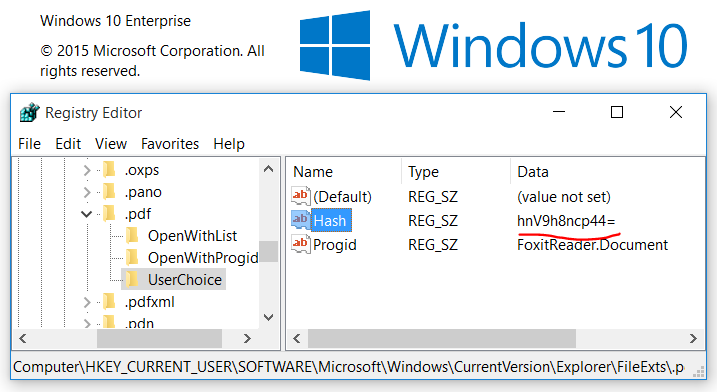
Some further rules for FTAs regarding registry entries:
- If there is a valid Hash and ProgId in HKCU\SOFTWARE\Microsoft\Windows\CurrentVersion\Explorer\FileExts\.pdf\UserChoice then this is your default handler.
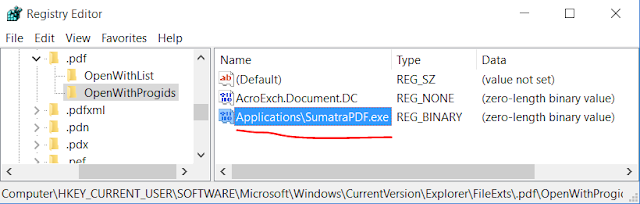
- If hash is invalid or does not exist then OpenWithProgIds and OpenWithList keys are compared. OpenWithProgIds has precedence. That means the MRUList value gives you the ordered list of applications. In our example below MRUList is bac, which means:
first is b = SumatraPDF.exe, second is a = FoxitReader.exe and third is c = AcroRd32.exe.
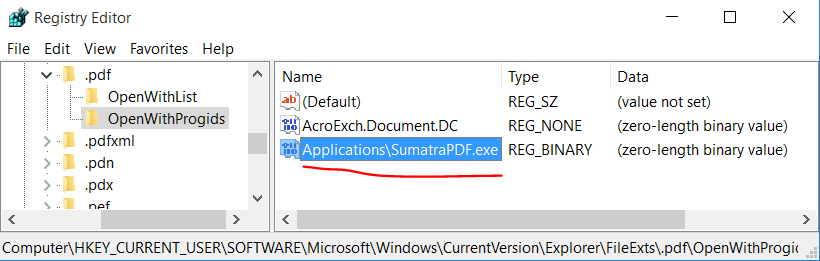
That means SumatraPDF is only used as default handler for .pdf if there is actually the correct corresponding ProgId in the OpenWithProgIds Key.
Please remember that OpenWithProgIds can also exist in HKCU\Classes\Software\.pdf\ and in HKLM\Software\Classes\.pdf\.
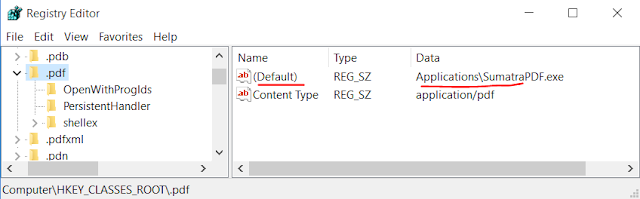
- If 1. and 2. does not match, then the selection for the default handler falls back to ProgId which is found in HKCR\.pdf\(Default). As we know this is a combind view of HKLM\Software\Classes and HKCU\Software\Classes, where HKCU takes precedence.


Monday, October 12, 2015
Session Picklist for VMworld 2015, Barcelona
There are so many session I am interested in at VMworld, but I need to make compromises because of conflicting schedules. This is my initial interest list:
STO5336 - VMware Virtual SAN - Architecture Deep Dive
STO5336 - VMware Virtual SAN - Architecture Deep Dive
This session walks you through the architecture decisions
made for VMware’s Virtual SAN (VSAN) product and the reasoning behind those
decisions. The first part of the session...
This session will walk you through the Virtual SAN product
architecture, so that you can have an in-depth technical conversation with your
customers about the inner workings...
PAR6641 - How to
Reduce Time to Sale and Increase your Deal Size for VMware’s End-User Computing
Business
In this session, you will learn about two FREE tools that will help reduce your sales cycle and make you become a trusted advisor for your customers. SysTrack Desktop...
Garry Owen
Ben Goodman
Marilyn Basanta
In this session, you will learn about two FREE tools that will help reduce your sales cycle and make you become a trusted advisor for your customers. SysTrack Desktop...
Garry Owen
Ben Goodman
Marilyn Basanta
Join us for a deep dive into Veeam® Availability Suite™ v9.
Anton Gostev (@Gostev) and Doug Hazelman (@VMDoug) will introduce v9’s new
features and enhancements designed to...
All about Virtual Volumes - the technical goods of what it
is and how it works from a senior architect in technical marketing and the
manager of the VVol R&D team!VMware...
VMware Horizon is a proven desktop virtualization solution
that has been deployed around the world. Balancing the performance and cost of
a storage solution for Horizon can...
Horizon 6 continues to evolve with new features and
functions that increase the breadth of use cases and enhance the end user
experience. This session will provide a...
VMware App Volumes enables real-time application delivery
and lifecycle management for Windows desktops and RDSH servers. This session
will provide a technical deep dive into...
The Internet of Things and connected cars are the next big
thing. In this session you will hear how existing VMware solutions contribute
to the value chain of connected car...
EUC5573
- Introducing Project Enzo – Low Cost, Simplified Desktop and Application
Deployment and ManagementOrganizations are seeking to accelerate their
ability to deploy and manage End User Computing (EUC) assets such as virtual
desktops and applications. At the same time, they...
This session will familiarize security architects and
operators with the security features of NSX and how they apply to the Horizon
View environment. We will review in detail...
The delivery of policy-managed containerized desktops to
end-points not necessarily owned by the business, or to end-points that are
offline more than online are modern use...
Futures & Trends for Hardware and Next gen distributed
services" - Insight into the new storage server hardware architectures:
shared NVMe/PCIe rack scale, flash densities,...
VMware NSX is leading the transformation of networking into
a software industry, bringing accelerated innovation and giving rise to new
technologies and new use cases. How...
Are you a vSphere expert? Curious about DevOps and
OpenStack? In this workshop you will get hands on experience on deploying
OpenStack on vSphere infrastructure and using...
Everyone wants mobility and user freedom but at what price?
Being able to provide user customized environment and session persistence, in a
non-persistent Virtualized...
App Volumes is a great solution for Just-In-Time application
delivery to your virtual desktops or your remote sessions (RDSH or Citrix).
There are a lot of ways to deploy...
In this session we will present how to build a stretched
cluster configuration on VMware Virtual SAN, in order to expand your enterprise
capabilities. A stretched cluster on...
Some people say that if you get the storage right in your
VDI environment, everything else is easy! In this fun-filled technical
workshop, attendees will receive a wealth of...
VMware NSX virtualizes the network and decouples logical
networks and services from the underlying physical infrastructure. By bringing
compute and networking together in a...
What kinds of virtual data services can plug into vSphere 6
and what would an administrator use them for? How does the Software Defined
Storage model for vSphere 6...
Join us for a session on VMware in the ‘Internet-of-Things’
(IoT). We’ll share insights and feedback from some of our customers, discuss
internal IoT projects and highlight...
Deep dive into UEM demonstrating all the features and
showing why every customer can benefit from UEM. Demo packed session which is
interesting for everybody who wants to...
In the brave new world of IT there is a shift in customer
expectations which which is driving a change in how applications are developed
and operated (e.g. DevOps), how...
VMware continues to innovate and evolve, introducing Linux
virtual desktops with Horizon. Come and join our session as we take you on a
technical deep dive for delivering...
Are you tired of managing complex backup workflows? Are you
confident in providing a successful recovery in the event of a failure? Is your
backup infrastructure a black hole...
The end-user computing landscape continues to evolve with
ever growing heterogeneity, new breakthroughs in application and device
management and unprecedented security for...
Hear directly from VMware’s strategists and field
professionals on End User Computing (EUC) Act 2 strategy into 2015 and beyond.
The session will provide peek into the...
How do you stay relevant when it seems that every other day,
another Silicon Valley upstart attempts to disrupt your business? How do you
keep up with its pace of innovation?...
Docker and container technology in general have been one of
the hottest technologies of the last year. At VMworld 2014, VMware boldy
announced that VMs and containers are...
How do you deliver ever more complicated environments
covering the vast array of technologies your developers are asking for? How do
you do this in timescales quicker than...
In this session you’ll get to insight into the perspectives
and thinking of VMware’s Chief Technology Officers (CTOs), i.e. the leaders
driving the technology agendas within...
Meet with a top subject-matter expert from VMware in this
intimate one-to-few setting. No presentations, just whiteboard tables,
flip charts, laptops, and deep-dive...
Meet with a top subject-matter expert from VMware in this
intimate one-to-few setting. No presentations, just whiteboard tables,
flip charts, laptops, and deep-dive...
A lot has been said and written about deduplication, and it
seems like it’s old news. There is a lot more than meets the eye, and not
every deduplication technique is born...
Using server memory to accelerate applications is not new.
But the traditional approach, which requires extensive changes to the
application and new hardware, is expensive...
Wednesday, October 7, 2015
PernixData Architect Beta - Small Hurdles
PernixData Architect is currently in beta.
There are already good articles on the internet which decscribe the details and what it is all about.
PernixData Architect Software
PernixData Architect - decoupled datacenter management
If you are also interested in the private beta bits then -> Get Architect Beta
In this article i would like to help over small hurdles when getting started with PernixData Architect Beta.
The install guide of PernixData Architect is very good. If you follow the steps percisely you should not have much issues during setup.
If have two tips here:
It seems that the beta bits currently have not a valid signature.
To work arround this issue you need to add the --no-sig-check parameter to your esxcli command line to suppress signature checking.

That looks good but where to find the PernixData Architect?
In my case PernixData Architect was not activated in the licensing tab.
Make sure to goto PernixData Hub > Licensing > Architect, select your vCenter Server and hit Start Trial.
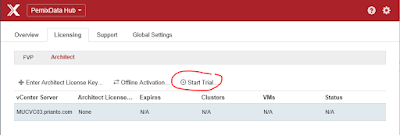
Immidiately and magically you get the menu item you are looking for :-)

Have fun!
There are already good articles on the internet which decscribe the details and what it is all about.
PernixData Architect Software
PernixData Architect - decoupled datacenter management
If you are also interested in the private beta bits then -> Get Architect Beta
In this article i would like to help over small hurdles when getting started with PernixData Architect Beta.
The install guide of PernixData Architect is very good. If you follow the steps percisely you should not have much issues during setup.
If have two tips here:
1. Error: Could not find a trusted signer.
When you are trying to install the PernixData Host Extension Module on your ESX host using esxcli, you will get an error message. [InstallationError]
('PernixData_bootbank_pernixcore-vSphere5.5.0_3.1.0.0-38307', 'Could not find a trusted signer.')
vibs = PernixData_bootbank_pernixcore-vSphere5.5.0_3.1.0.0-38307
Please refer to the log file for more details.
It seems that the beta bits currently have not a valid signature.
To work arround this issue you need to add the --no-sig-check parameter to your esxcli command line to suppress signature checking.
esxcli software vib install -d /tmp/PernixData-host-extension-vSphere5.5.0_3.1.0.0-38307.zip --no-sig-check
2. Activate PernixData Architect Trial
After you have successfully installed the PernixData Host Extension and also the PernixData Management Server the install guide directs you to https://[PernixData Management Server]:60002 or http://[PernixData Management Server]:60001 in case you have not adjusted the default ports.
In my case PernixData Architect was not activated in the licensing tab.
Make sure to goto PernixData Hub > Licensing > Architect, select your vCenter Server and hit Start Trial.

Immidiately and magically you get the menu item you are looking for :-)

Have fun!
Subscribe to:
Posts (Atom)